Guide · Gig history
How to remember every concert you've been to
Updated
If you've been going to gigs for years, you've probably forgotten more of them than you'd like to admit. This guide shows you how to remember every concert: first by rebuilding your past history from the trail of emails, payments and photos you've already left behind, then by setting up a simple habit so you never lose another one.
The problem
Why we forget gigs
Nobody forgets their first gig. It's the fortieth, the hundredth, and all the Tuesday nights in between that slip away. A few things work against you:
- Volume. Go to a couple of shows a month and that's well over two hundred in a decade. Memory keeps the standouts and quietly drops the rest.
- Support acts. You might remember the headliner, but the two bands on before them rarely stick, even when one of them went on to become a favourite.
- Years blur together. Seeing the same band on three different tours makes it hard to say which venue was which, or whether that great night was 2016 or 2019.
- Festivals compress everything. A three-day weekend might include twenty sets, and most of them merge into one muddy memory.
- The evidence is scattered. Tickets are in one inbox, photos in another app, stubs in a drawer and the setlist nowhere at all.
The good news is that most of that evidence still exists. You just need to gather it in a sensible order.
Part one · The method
Rebuild your past concert history in eight steps
- 01
Start one master list
Pick a single place for everything: a notebook, a spreadsheet or a gig diary app. Write down every show you can recall off the top of your head, even if the date is a guess.
- 02
Search your email
Ticket confirmations are the richest source. Search every inbox you've ever used, including old university or work accounts you can still log into.
- 03
Check ticket accounts
Log into the ticket sellers you've used. Many keep an order history that shows past events, even when the confirmation email has long gone.
- 04
Scan bank statements
Look for payments to ticket sellers and venue box offices. They catch gigs bought on a different email address or by card on the door.
- 05
Go through your photos
Your camera roll has a date, and often a location, on every picture and video. Night-time clusters at venues are usually gigs.
- 06
Trawl social media
Old posts, check-ins, stories and memories features often mention who you saw and who you went with.
- 07
Confirm on Setlist.fm
Search the artist or venue to pin down exact dates and see who was on the bill, which helps you recover forgotten support acts.
- 08
Ask your gig mates
Send your list to the friends you go with. They'll remember shows you've forgotten and correct the ones you've got wrong.
Part one · In detail
Where to find old concert tickets and proof you were there
1. Your email inbox
If you bought tickets online, there's almost always a confirmation email. Search for the names of the ticket sellers you've used. In the UK the common ones include Ticketmaster, See Tickets, Gigantic, Skiddle, AXS, Dice and Eventim, plus individual venues and promoters that sell their own tickets. Then try generic phrases that turn up in most confirmations:
- "e-ticket" and "your tickets"
- "order confirmation" and "booking confirmation"
- "doors open" and "admit one"
- "event reminder" and "know before you go"
In Gmail and Outlook you can narrow things down with search operators, for example from:ticketmaster or subject:"order confirmation". Gmail also understands before: and after: with a date, which is handy for working through one year at a time. Check spam, archive and promotions folders too, because confirmations often end up there.
Note that the email date is when you bought the ticket, which can be months before the gig. The event date is usually in the body of the email or on the attached ticket.
2. Ticket seller accounts
If you've deleted the emails, log into your accounts with the sellers above. Many show past orders, though how far back they go varies. While you're there, it's worth checking any app-only tickets on your phone, as some sellers deliver tickets inside their own app rather than by email.
3. Bank and card statements
Search your banking app for the ticket seller names, venue names and words like "tickets" or "box office". This catches gigs booked on an email address you no longer use, and tickets paid for by card at the door. Many banking apps only let you search back a limited number of years; older statements can usually be requested from your bank. PayPal's activity history is worth checking too if you ever paid for tickets that way.
4. Social media posts and memories
Scroll back through your own posts on Facebook, Instagram, X or wherever you shared things at the time. Look for check-ins at venues, blurry stage photos and "who's going?" posts. Facebook's Memories surfaces old posts on each date, and most platforms let you download a copy of your data, which you can search for venue names in one go. Events you marked as "going" are another useful clue, but treat them as possibles rather than proof.
5. Setlist.fm
Setlist.fm is a public database of setlists that you can search by artist, venue and date. It's the best way to turn "I saw them at the Academy around 2014" into an exact date. Search the artist, scan their past shows for the venue and city you remember, and open the setlist: if the songs match what you remember hearing, you've probably found your gig. Listings often include the other acts on the bill, which is how many people recover support bands they'd completely forgotten. If you sign up, you can also mark the shows you attended. Coverage is strong for touring bands and patchier for small local nights, so don't worry if a show isn't listed.
6. Physical stubs, wristbands and merch
Check drawers, old wallets, scrapbooks and that box in the loft. Paper stubs usually show the date, venue and price. Festival wristbands often carry the year. Tour T-shirts with dates printed on the back can confirm which tour you saw, and old diaries or wall calendars sometimes hold the rest.
7. Friends who were there
Once your list is in decent shape, share it with the people you usually go to gigs with. They'll fill gaps from their own emails and photos, and they're great at remembering the nights you'd rather forget.
Gigs that are easiest to miss
When you think you're done, run through this list once more:
- Shows where a friend bought the tickets, so there's no email or payment in your name
- Free gigs, in-store sessions and pub shows with no ticket at all
- Local bands, Battle of the Bands nights and open mics
- Every individual band you saw at a festival, not just the festival itself
- Support acts who are now headlining in their own right
Part one · Photos
Your camera roll is a gig diary in disguise
Every photo and video your phone takes is stamped with a date and time, and if location was switched on, a place as well. That makes your camera roll one of the best answers to "what concerts have I been to?"
- Search your photo app for venue names or city names. Google Photos and Apple Photos can both search by place.
- Look for bursts of dark, blurry pictures taken late in the evening. That's nearly always a gig.
- Check the info panel on a photo to see the exact date, then confirm the show on Setlist.fm.
- Don't forget old phones, memory cards and photos friends sent you on messaging apps.
Once you've found the best shots for each night, keep them with the gig rather than leaving them buried among thousands of other pictures.

Part two
What to record for each gig
A list of band names is a start, but a record you'll actually enjoy looking back on needs a bit more. For every show, aim to capture:
- Date. The anchor for everything else, and the thing that makes "on this day" throwbacks possible.
- Headliner. Who you went to see.
- Support acts. The detail people regret not writing down most often.
- Tour name. Useful when you've seen the same band several times.
- Venue and city. Including the room, if the venue has more than one.
- Ticket price. Interesting later, especially when you compare prices across the years.
- Your rating. A quick score out of five or ten tells future you which nights were special.
- Who you went with. Often the part of the memory that matters most.
- Photos and videos. A handful of the best, not all two hundred.
- Setlist. Or a link to it, so you can relive the night song by song.
For past gigs you're rebuilding, don't let missing details stop you logging the show. A date, a band and a venue are enough to start; you can add the rest as you find it.
Example
What a complete gig entry looks like
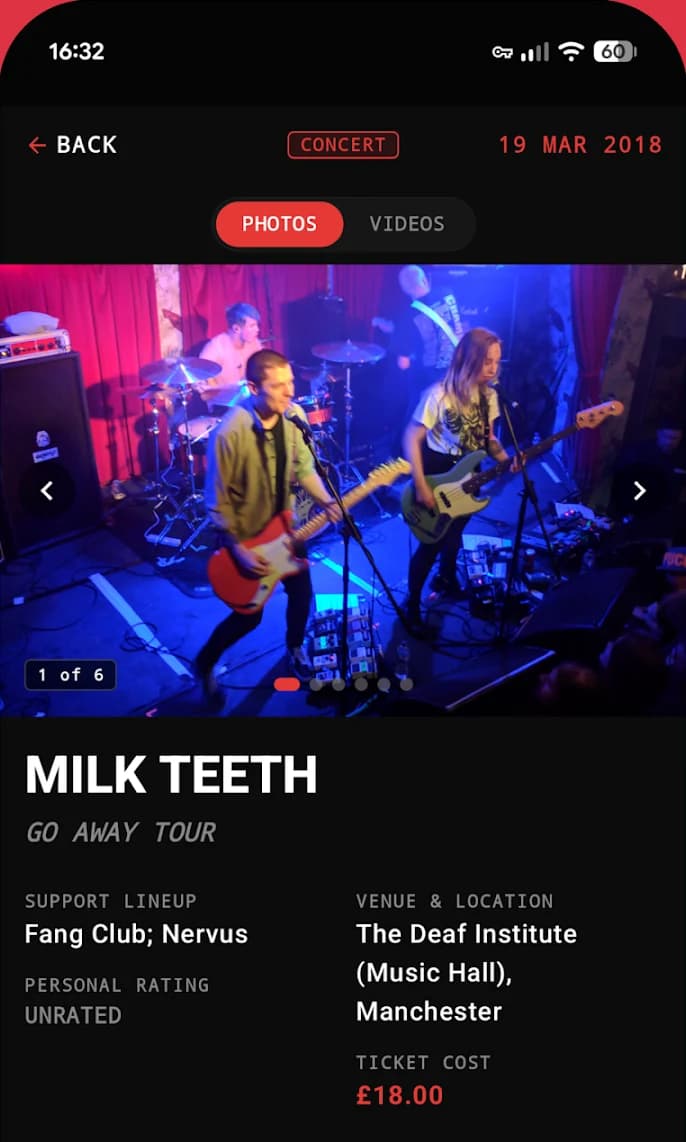
Here's an example from StubStash: Milk Teeth on the Go Away Tour at The Deaf Institute (Music Hall), Manchester, on 19 March 2018, with support from Fang Club and Nervus. The ticket was £18.00.
Alongside those details sit a personal rating, photos and videos from the night, and a direct Setlist.fm link that opens the setlist in one tap. Years later, that one screen answers every question you might have about the gig.
See how logging works in more detail on the concert tracker app page.
Part three
How to remember every concert from now on
Rebuilding your history is a one-off job. Keeping it complete is about habit, and the habit is simple: log the gig on the night or the next morning. Do it on the train home, in the queue for the cloakroom, or with a coffee the day after. Support act names, the setlist and how you felt about it are the first things to fade, so capture them while they're fresh.
Make it one place, not five
The reason gigs get lost is that the details end up scattered. A spreadsheet works if you're disciplined, but it won't hold your photos or videos. That's the gap StubStash was built to fill. It's a free Android app that works as your personal live music archive:
- Concerts: log headliners, support acts, tour titles, venues, dates, ticket prices and your rating, then attach photos, videos and a Setlist.fm link.
- Festivals: track multi-day festivals with daily headliners, undercards and ticket prices, grouped by year with day-by-day lineup tags. More on that in the festival tracker guide.
- Battle of the Bands: log each round, the competing acts, guest headliners and who you voted for, so local nights don't slip through the cracks.
- Venue and artist directories: A to Z indexes of every venue you've been to and every band you've seen live, showing when, where and how many times.
Let the past come back to you
With StubStash Pro, an optional in-app upgrade, the On This Day nostalgia feed shows what you were watching on today's date in previous years. Pro also adds personal analytics such as average ticket price and your most-seen artists (see concert stats) and removes ads.
A routine that sticks
- Add upcoming gigs as soon as you buy the tickets.
- On the night, take a few photos and note the support acts.
- Next morning, add your rating, the ticket price and the Setlist.fm link.
- Pick your best two or three photos or videos and attach them.
- Once a year, look back through your venue and artist lists and enjoy how far you've come.
FAQ
Questions
How do I find my concert history?
Start with your email: search for ticket confirmations from sellers such as Ticketmaster, See Tickets, Skiddle, AXS and Dice, plus phrases like "e-ticket" and "order confirmation". Then fill the gaps with bank statements, the dates on your gig photos, old social media posts and Setlist.fm.
How can I find old concert tickets?
Most tickets bought online leave an email confirmation, so search your inbox (including old email accounts) for the seller's name and words like "your tickets". If the email has gone, your ticket seller account may still list past orders, and your bank or card statement will show the purchase date and seller.
How do I make a list of concerts I've been to?
Put every gig you can find into one place, one entry per show, with the date, headliner, support acts, venue and city. Confirm uncertain dates against Setlist.fm or the artist's old tour dates, and mark anything you can't verify as approximate rather than leaving it out.
Can Setlist.fm tell me what concerts I've been to?
Setlist.fm is a public database of setlists that you can search by artist, venue and date, so it's very good for confirming when a band played a particular venue. It only knows which shows you attended if you have marked them yourself.
What's the best way to keep track of concerts in future?
Log each gig on the night or the next morning while the details are fresh: the support acts, the setlist and how good it was fade quickest. A dedicated gig diary app such as StubStash keeps the ticket price, rating, photos and Setlist.fm link together in one entry.
Is StubStash free?
StubStash is free to download on Google Play for Android and contains ads. An optional Pro upgrade adds personal concert analytics, the On This Day nostalgia feed and removes ads.
Keep exploring
More from StubStash
feature
Concert tracker app
Log every concert you've been to: headliners, support acts, venues, prices and ratings.
Read more →feature
Gig diary
A digital gig diary for UK music fans, with every gig, venue and ticket stub in one place.
Read more →feature
Festival tracker
Track multi-day festivals with daily headliners, undercards and memories.
Read more →